Explainer
Why a G120 OPC server link uses DP/FML cyclic telegrams
Short answer
Build the SIMATIC NET OPC link to the three G120 drives on the DP/FML service with a standard telegram, because the S7 path did not pass data through the OPC server at the tested OPC and CU240S-DP-F firmware releases. Expect exactly the telegram's cyclic words, verify the measured update by timestamps, and route parameters outside the telegram through a separate S7 application.
On this page
- Why does the OPC server talk to a G120 over DP/FML instead of S7?
- What does a standard telegram fix before OPC ever starts?
- How do you configure the PC and the OPC server for DP slaves?
- How do you map OPC items to the telegram words?
- How fast is the cyclic data really?
- Which service needs the SIMATIC NET license?
- What happens when a parameter is not in the telegram?
- Which path do you commit to for your project?
- Questions asked
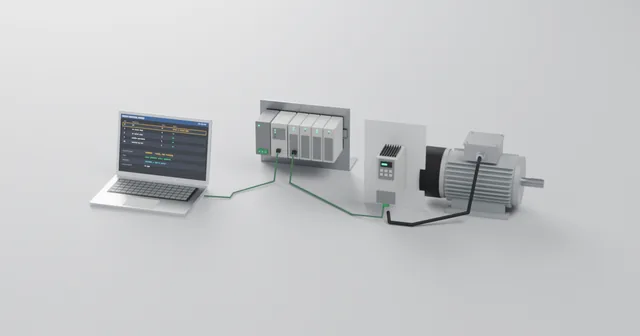
Build the link to a G120 on the DP/FML service with a standard telegram, and leave S7 out of the OPC namespace. On the tested installation — three SINAMICS G120 drives with CU240S-DP-F control units on PROFIBUS, a PC fitted with a CP-5611, and the SIMATIC NET OPC server — the S7 configuration let OPC Scout list all three drives but returned no values, while DP/FML moved cyclic telegram data on every station. That result decides the architecture. This article covers why the two services behave differently, what a telegram fixes before OPC ever starts, the documented configuration route, how to map and prove the items, what the measured update rate does and does not promise, where the license actually bites, and the path for parameters with no cyclic word.
Why does the OPC server talk to a G120 over DP/FML instead of S7? #
Because at the tested SIMATIC NET OPC and CU240S-DP-F firmware releases, the S7 service delivered no drive data through the OPC server, while DP/FML carried the cyclic standard-telegram words on all three drives — so the working link is DP/FML, and S7 stays out of the OPC namespace.
The two services move data differently. DP/FML is the PROFIBUS service that exchanges a fixed process image every bus cycle with little overhead: once the connection is up, the same words travel both ways without anyone asking. S7 is a session-based service for on-demand reads and writes aimed at parameters. The drives were never the obstacle — the same CU240S-DP-F units accepted S7 from a standalone application — but at the tested OPC server and control-unit firmware releases, that S7 path delivered nothing through the OPC server, with the manufacturer's own support engineers unable to close the gap. Build the design on DP/FML unless a live test at your installed releases proves the S7 path returns values.
The silent-parameter-channel split is not unique to OPC. On the PLC side of a PROFIBUS drive link, cyclic data can run perfectly while the parameter words stay empty — the same shape of failure the article on why PKW words stay empty while cyclic PROFIBUS data works documents for an S7-1200 and a PROFIBUS starter. If cyclic data flows and parameter access does not, you are looking at two separate services, and each needs its own proof.
What does a standard telegram fix before OPC ever starts? #
The telegram fixes the number, order, direction and meaning of the cyclic words, so every value OPC can ever deliver from a drive is decided by the telegram you assign in the DP configuration, not by anything you name later in OPC Scout.
Cyclic is a contract about words, not a window onto the drive's parameter list. Write the mandatory runtime list before opening any configuration tool. On the tested project that list was one PC-to-drive value — the speed setpoint — and the drive-to-PC values the process could not run without: actual speed, the status word and the fault number. Four functions, four telegram words, each mapped by name in the telegram table. The ramp-rate request was on the wish list too, and it mapped to nothing: 0 of 1 ramp requirements could be served cyclically. Dropping it was a scope decision made on paper, and that decision — not any OPC setting — is what let the cyclic route succeed. No offset trick, undocumented word or renamed item substitutes for a missing telegram word.
Choose the smallest standard telegram the CU240S-DP-F supports that covers the whole mandatory list, and assign exactly that telegram at both ends of every connection. Confirm the configured input and output lengths match on the drive side and the PC side before commissioning. One contract detail catches people: if the telegram variant you pick carries sign-of-life words, the PC must send the toggling pattern or the drive's monitoring reacts — the guide to configuring Standard Telegram 2 sign of life for an S7-1500 and a G120 shows what that obligation looks like in practice.
How do you configure the PC and the OPC server for DP slaves? #
The documented route for DP slaves straight into the SIMATIC NET OPC server is four steps: configure the stations with COM PROFIBUS, set the PG/PC interface, open OPC Settings under Start > SIMATIC > SIMATIC NET > OPC Server and complete the OPC Parameters tab, then test the connection.
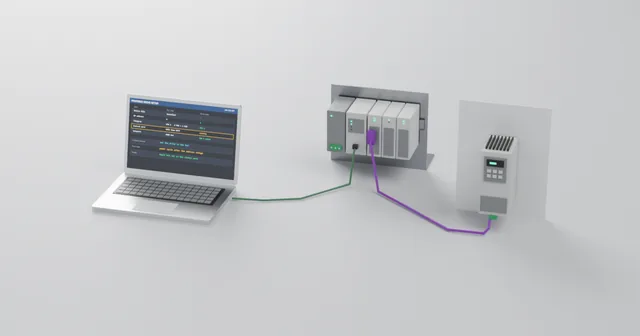
The vendor's support entry on connecting DP slaves directly to the SIMATIC NET OPC server covers those four steps end to end. With the CP-5611 as the PC's PROFIBUS interface and all three drives on one segment, it breaks down as follows:
- Configure the stations in COM PROFIBUS: the PC station with the CP-5611, each drive as a separate DP slave at its real station address, and the chosen telegram with its input and output lengths on every slave.
- Set the PG/PC interface to that CP-5611 with the segment's transmission rate and the PC station's own PROFIBUS address.
- Activate the configuration through the installed SIMATIC NET configuration environment, then open OPC Settings from the Start menu under SIMATIC > SIMATIC NET > OPC Server and complete the OPC Parameters tab.
- Test before naming a single item: all three stations must enter and hold cyclic data exchange.
A station that repeatedly drops and returns is a wiring or addressing fault, not an OPC problem, and the drive announces the loss in its own language — on the PROFINET sibling fieldbus the G120 raises A08526 no cyclic connection, which the article on why a PROFINET drive reports A08526 no cyclic connection traces end to end. Browsing that lists the drives proves configured visibility, nothing more.
Specify the cabinet side at the same moment as the network side: the PC hosting the OPC server runs unattended next to the drives for the life of the installation, so it belongs in the specification as an industrial mini PC rather than a repurposed office desktop.
How do you map OPC items to the telegram words? #
Create the OPC connection on the DP/FML service and map each item to its telegram word by hand: drive-to-PC words are read items, PC-to-drive words are write items, and a one-condition-at-a-time change test is the only proof that a word sits where you think it sits.
In OPC Scout, browse the DP/FML branch for each drive and add the input items first, with output writing disabled. Force one observable drive condition at a time and confirm that exactly its assigned field moves, decoded to match what the drive itself displays. Only then add the write items, and one safety rule governs that step: a control word mapped to the wrong offset can command an unplanned start, so bring outputs live with the machine in a safe state under your site's lockout practice, and prove the path with a controlled, low-risk speed command while watching the setpoint word and the returned actual-speed word move together.
Byte order, scaling and status-bit meaning come from the drive's telegram tables; the OPC browser shows raw words and will not decode a bit for you. Close the mapping with four checks: configured lengths identical at both ends, all stations holding data exchange without flapping, a single-condition change moving exactly one field, and client timestamps steady at the commissioned interval with no stale-quality flags and no processor spikes on the server PC.
How fast is the cyclic data really? #
The working project was tuned to a 10 ms OPC update rate, and that number is a measurement from that installation — not a rating for yours; the data age you see is the sum of the OPC update, the DP bus cycle, PC scheduling, server load and client polling.
Every term in that sum moves the result. A busier server or a loaded PC pushes the observed age up by tens of milliseconds; a client demanding an interval the bus cannot serve just multiplies the load without freshening one value. The tested project reached its commissioned rate by tuning against real traffic on all three drives, and the number belongs to that installation's hardware and load — treat it as a target you verify, never as a datasheet figure.
Verification is a stopwatch job. Force repeated, known changes at the drives, timestamp each arrival at the OPC client, and expect stable intervals with no stale-quality indications and no missed control transitions while the PC carries its normal load. If the process genuinely needs younger data than you measured, the honest fix is a controller-side cyclic link that owns the bus timing, not a smaller number typed into the client.
Which service needs the SIMATIC NET license? #
The S7 service is the licensed one: on the tested installation, switching the connection to S7 produced the license prompt while the DP/FML cyclic path ran without one, and where the manufacturer's own statements about DP licensing disagreed, the license manager of the installed package settles it before purchase.
The prompt that appeared after building the S7 configuration identifies use of the licensed S7 OPC service. It is a licensing message, not a network diagnostic: it says nothing about DP wiring, station addresses or telegrams, and it showed up at exactly the moment the S7 path stopped delivering values, which is an easy pair of facts to misread as cause and effect.
Licensing is also where the arithmetic of the decision becomes visible. S7 capacity is sold per connection: the documented Industrial Ethernet SOFTNET-S7 Lean key, for example, allows up to 8 S7 connections, or 10 from WinCC V8.1. Run the example for this project: serve the three drives through the S7 service and each drive session consumes one connection, so 8 - 3 = 5 connections remain for every other S7 consumer on that PC. The DP/FML route keeps the drive words on the DP service and leaves the S7 budget untouched. Where a service is licensed, use it licensed; there is no configuration trick around that.
What happens when a parameter is not in the telegram? #
Nothing in OPC reaches it: a parameter outside the telegram's field set has no cyclic slot, so the two documented fixes are a larger supported telegram or a separate application that speaks S7 to the control unit directly, outside the OPC server.
Rebuilding the same cyclic connection under different item names exposes nothing new; the field set is fixed at configuration time. The tested project proved the direct path works where the OPC path did not: the same CU240S-DP-F units accepted S7 from a standalone application, so the team planned a dedicated PC application with its own connection to the drives for on-demand parameter work, over PROFINET with acyclic exchange, instead of fighting the namespace.
The controller-side equivalent is standard practice now: a controller owns the cyclic telegram and reaches parameters through acyclic record writes between cycles, which is exactly the pattern in the walkthrough of Telegram 1 with acyclic WRREC writes on an S7-1200 and a SINAMICS drive. The trap also has a name in every drive family: a telegram omits data you assumed it carried, as the case of Telegram 111 leaving out SINAMICS S210 digital input status shows. Assume nothing about a telegram's contents that its own table does not state.
Which path do you commit to for your project? #
Commit by case: values inside the telegram go over DP/FML through the OPC server; parameters outside it go to a larger telegram or a separate S7 application; S7 items inside OPC enter the design only after a live test at your installed releases returns values.
- PC-side speed control and status on PROFIBUS G120 drives, mandatory list inside the telegram: DP/FML service, one standard telegram assigned identically at both ends, mapping proven by the one-condition test, outputs enabled last under lockout.
- A mandatory ramp time or any other out-of-telegram parameter: move to a larger supported telegram only if its table truly carries the value; otherwise plan the separate S7 application with its own connection, or hand drive control to a controller that pairs the cyclic telegram with acyclic record writes.
- Growing S7 usage across clients: size the S7 license in sessions before purchase, because connection-count keys make that arithmetic concrete.
- A new machine rather than a retrofit: PROFINET control units with a controller owning cyclic plus acyclic access — the direction the tested project itself took.
The tested combination worked because its mandatory list fit the telegram and the one wish-list item that did not fit was struck on paper before commissioning. Write that list, make those two calls, and the link stops being mysterious.
Questions asked
Does the same S7-through-OPC failure apply to G120 control units on PROFINET?
No conclusion transfers automatically. The tested failure was the S7 service through the OPC server to PROFIBUS CU240S-DP-F units at those releases; it says nothing about PROFINET control units, where a controller speaks cyclic telegrams plus acyclic records directly and a lost cyclic connection raises its own fault. Plan the PC link and the fieldbus separately, and test the S7 path at your installed releases before designing around it.
Why did the drives still appear in OPC Scout when the S7 link failed?
Browsing shows what the configuration declares, not what a service delivers. A station can sit in the namespace with no values behind it, and the license prompt only proves an S7 OPC session was requested. Judge the path by values that change in the client when a drive condition changes; the browse tree and the prompt are each inconclusive on their own.
Can the DP/FML OPC link and a direct S7 application run against the same drives?
They are separate applications with separate connections, and the tested project treated them that way: DP/FML through the OPC server owned the cyclic words, while the on-demand parameter work was planned as a dedicated PC application speaking S7 to the control units on its own interface. Do not merge the two into one OPC namespace; at the tested releases the S7 side returned nothing through the server.
Which drive functions never fit a standard speed telegram?
Configuration-type parameters have no cyclic slot at all: ramp times, motor data, protection and monitoring settings live in the drive's parameter set, not in the telegram words. Setpoints, actual values, control and status words and the fault message are what travel cyclically. If commissioning depends on writing configuration from the PC, plan the acyclic application from the first drawing, because no OPC item for those values can exist.