Troubleshooting
Why CODESYS cannot reach Neuron I/O over the Modbus overlay
Short answer
The error is a platform mismatch, not a register address. The deprecated overlay serves only a manually configured Modbus TCP device on its loopback server; the Neuron CODESYS package's driver needs UniPian or the full Neuron kernel drivers, with both CODESYS tools at release 3.5.12.0 or later. Install UniPian for the package, or keep the manual device on Raspbian and treat the overlay as frozen legacy.
On this page
On a Neuron controller, the CODESYS message that the Modbus gateway does not reply is a platform and driver mismatch, not a register address. The deprecated TCP Modbus overlay exposes the I/O through a userspace Modbus TCP server on 127.0.0.1:502, and that server serves one arrangement only: a manually configured Modbus TCP device in the CODESYS project. The UniPi Neuron for CODESYS package takes a different path, its Neuron driver against the Group 1 parameters, and it is supported on the UniPian image only, or on a system carrying the full Neuron kernel drivers. Raising the CODESYS versions on plain Raspbian does not close that gap. What follows is the two paths, the proof of where the request dies, and the decision for your installation.
Two paths from CODESYS to the Neuron I/O #
Untangle the terminology first, because it points people the wrong way. The entry CODESYS calls a Modbus TCP Slave device represents the remote server, here the Neuron, while the CODESYS runtime is the client that initiates every read and write. CODESYS never becomes the Modbus slave: the Neuron side serves, CODESYS requests.
| Path | What serves the I/O | What the project needs |
|---|---|---|
| Manual Modbus TCP device | The overlay's userspace server on the loopback address, TCP port 502 | A Modbus TCP Slave device entry, Modbus client function blocks, channels mapped from the published register and coil map |
| UniPi Neuron for CODESYS package | The Neuron driver reading the Group 1 parameters | UniPian, or the full Neuron kernel drivers on another system; both CODESYS tools at or above the documented release floor |
Identify which path a project uses before changing anything: a device added by hand in the device tree is the first path, Neuron device entries placed by the package are the second. The two are not interchangeable. The overlay is a heavily simplified userspace version of the vendor's drivers, built for EVOK, and it does not expose what the package's Neuron driver talks to.
What the no-reply message actually tells you #
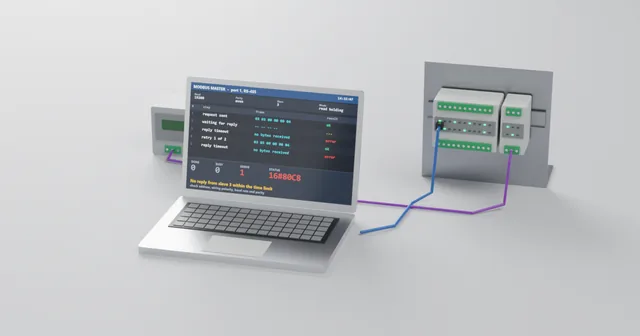
The message means the request to the Modbus endpoint never completed. It appears before any register is interpreted, so it cannot be an addressing fault: a wrong register address produces a reply, the exception 0x0002 illegal-data-address response, and that failure mode is covered in fixing CODESYS Modbus TCP exception 0x0002. Silence at the endpoint means the server is absent, not listening, or dropping the request.
A packet capture on the loopback interface while a task polls proves which. Take one read of 8 holding registers. Modbus TCP frames carry a 7-byte MBAP header, 2 bytes transaction identifier, 2 protocol identifier, 2 length, 1 unit identifier, and no CRC. The request is 7 + 1 function code + 2 start address + 2 quantity = 12 bytes. The reply is 7 + 1 function code + 1 byte count + 2 bytes per register, so 7 + 1 + 1 + (2 × 8) = 25 bytes.
Twelve-byte requests with nothing coming back: the endpoint is not serving. Twenty-five-byte replies: the server path is healthy and the fault sits in the device configuration or the application. One documented limit belongs with the capture: a single function 03 read carries at most 125 registers, so a map block wider than that needs several requests per cycle.
Why the version minimum is not the problem #
The datasheet floor is CODESYS and CODESYS for Raspberry Pi at 3.5.12.0 or later. The reported failing installation already ran CODESYS 3.5.12.20 with CODESYS for Raspberry Pi 3.5.12.10 on official Raspbian Stretch, overlay installed, and the package's demo application still reported the silent gateway. Those two numbers rule out a version deficit. What remained was the platform. The package is supported on UniPian only, and the overlay is a simplified userspace implementation that its own repository now marks deprecated, legacy support for old deployments, intended for EVOK. A working EVOK stack on a plain Raspbian Stretch install is its own repair, covered in resolving EVOK install failures on Raspbian Stretch. The Neuron driver needs the full driver stack, so no overlay build answers it.
Commission the manual Modbus TCP route #
Choose this route when the overlay is the endpoint and you accept task-cycle polling. It is proven: one installation ran it all winter as a heating controller.
- Install the Neuron TCP Modbus overlay and its Modbus server on the target, then confirm the server process is up and bound to its port.
- In the CODESYS device tree, add a
Modbus TCP Slavedevice and point it at 127.0.0.1 on TCP port 502, the port registered for Modbus. - Build the channel list strictly from the published Neuron register and coil map: match each entry's address and data type, and never infer an address from a channel name.
- Drive the transfers with Modbus client function blocks; one long-running installation used the OSCAT network library blocks.
- Read a known point first, toggle a physical input and watch the mapped register track, before the value goes into control logic.
The client side is ordinary CODESYS Modbus work, with the same settings walked through in setting up a CODESYS Modbus TCP client to talk through a gateway. Keep one rule: only one process can bind the Modbus port, and a second server on the machine becomes the conflict described in why a custom Modbus TCP slave fails on port 502.
Move to UniPian for the package #
Choose this route when you need the package itself: direct device configuration, the Group 1 parameters, and the analog output setup it provides.
- Put the machine in a safe state first: the controller is down during the reflash, and every output, a heating valve or a dimmed lamp, sits wherever its fail-safe leaves it.
- Record the four versions, UniPian, CODESYS, CODESYS for Raspberry Pi, and the package, before wiping anything; that list is the first thing any diagnosis needs.
- Flash UniPian and bring the runtime up.
- Install CODESYS for Raspberry Pi and the package, with both CODESYS tools at 3.5.12.0 or later.
- Add the Neuron devices exactly as the datasheet describes, then run the demo application that ships with the package.
- Read the demo as the divider: if it exchanges data, migrate the application; if it reports the silent gateway, the fault is still platform or installation, and application logic is the wrong place to work. An older project opened in the newer release asks for an application update: accept it, then select each device in the tree and run
Update Device.
If EVOK reports no board on SPI afterwards, that is a separate kernel-driver fault, covered in resolving no-board-on-SPI errors on a Neuron M203.
Give the 1-Wire bus one owner #
OWFS and the package's built-in 1-Wire drivers cannot both drive the bus. Pick one owner and stay there: keep OWFS reading the sensors, or switch to the CODESYS 1-Wire drivers if they support the sensor. Both claiming the interface is a bus conflict, not a tuning problem.
The decision for your installation #
- You need the package at all, for its device blocks and analog output functions: run UniPian. On plain Raspbian the answer is no, and no version pair changes it; the reported 3.5.12.20 and 3.5.12.10 pairing already failed there.
- You keep Raspbian: the manual Modbus TCP device against the overlay is the only path that can answer. Commission it as above, prove one read replies, and treat the overlay as frozen legacy, software to maintain rather than to build on.
- The manual device stays silent too: same verdict, the endpoint is not serving. The repair that worked in the reported case was UniPian, where the manual device answered first and the package answered after it.
Questions asked
Why does the Neuron package need CODESYS 3.5.12.0 or later?
That release changed the Modbus devices inside CODESYS in small ways, and the Neuron drivers depend on the change, which is why the datasheet sets it as the floor for both CODESYS and CODESYS for Raspberry Pi. Below the floor the driver fails at the Modbus layer no matter how the devices are configured; above it, the version stops being the suspect and the platform takes its place.
Is EVOK an alternative to the overlay for CODESYS access?
No. EVOK is an API layer that sits on top of the Modbus TCP server, so for CODESYS it only inserts an extra layer and its latency between the application and the I/O. It does not satisfy the Neuron package either: the package needs the full driver stack regardless of what else is installed, and the overlay itself was built for EVOK, not for CODESYS device drivers.
Can CODESYS keep reading the 1-Wire sensors through OWFS?
Yes. One installation read the OWFS mountpoint from structured text with the sysFile library, and the approach survives the move to UniPian: install OWFS, remove the DS2482 device-tree overlay so OWFS owns the bus, and leave the package's devices out of 1-Wire entirely. The Modbus device configuration is untouched by this choice.
Can the rest of a Raspbian setup move to UniPian?
Yes. UniPian is a lite image of the same Stretch generation, so the packages a plain Raspbian install carried, such as a music streamer, a fixed address or OWFS, go back on the same way. The one known clash is the 1-Wire bus, which needs a single owner. In the reported case nothing else had to change.